


FAMILIES | TalkingPoints
4.41.77K Reviews
App Specs
- Version
- 4.2613.0
- Updated On
- License
- Free
- Downloads
- 1,000,000+
- Developer
- TalkingPoints
- Categories
- Education
- Platform
- Android, iOS
Screenshots
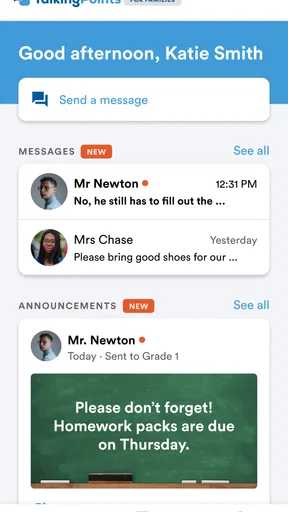
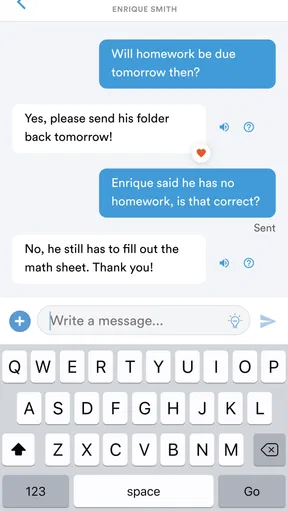
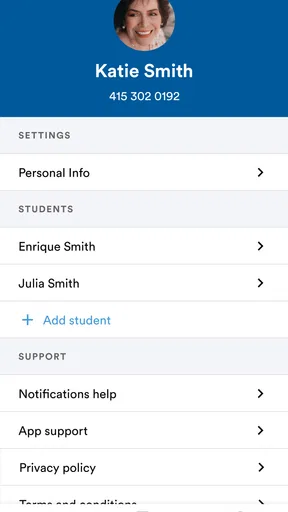
 Analysis by AppCompare
When a school wants families to stay informed, the hardest part is often not sending a message. It is making sure the message reaches the right person, in a form they can understand, without turning communication into another confusing stream of notifications. FAMILIES | TalkingPoints is an education app built around that everyday problem. I see it as a bridge between schools and families rather than a general-purpose chat tool, and that distinction matters when deciding whether it belongs on your phone.
I reviewed it with a practical question in mind: would this make school communication easier for a parent, guardian, teacher, or school team? My answer is generally yes, especially when a school already uses TalkingPoints as part of its communication routine. The app is free, aimed at Everyone, and developed by TalkingPoints. It has grown into a widely used education app, with more than a million installs and an average rating of 4.4 from roughly seventeen thousand ratings.
That popularity should not be treated as proof that it suits every family. Communication apps work best when the school and the people at home use the same channel consistently. If your school does not rely on this service, installing it alone will not replace the school’s existing system. The real decision is therefore less about whether it has a long feature list and more about whether it reduces the friction between classroom information and family life.
What to consider before choosing a school communication app
Before settling on a school communication app, I would look at more than its interface: the channel only helps if families and school staff agree when to use it and what deserves a reply. I’d also consider how many caregivers need access and which kinds of messages must remain easy to find later. That practical check makes it easier to judge whether a dedicated app will simplify the routine or merely add another inbox.
Start with the communication problem, not the app category
Parents usually need a reliable way to notice school messages, understand them, and respond when a reply is needed. Teachers need a way to contact families without repeating the same information through several unrelated channels. School staff need communication to remain organized enough that important updates do not disappear among casual conversations. I judge FAMILIES | TalkingPoints against those practical needs rather than against social messaging apps.
This is important because a familiar messenger may feel faster for one-to-one conversation, while an email inbox may appear more formal and searchable. Neither option is automatically better for school communication. A dedicated education app has value when the school’s messages, family replies, and language needs are handled within one expected place.
The first question I would ask is whether your child’s school, teacher, or district actively uses TalkingPoints. If the answer is yes, the app becomes much more useful because it connects you to an existing communication workflow. If the answer is no, there is little reason to choose it over the channel your school already monitors. This is a service that depends on participation from both sides.
Worth Reading Before You Choose

EA SPORTS FC Mobile 26 Is a Bigger Football Game, but It Takes Time

Flipboard Shows What News Apps Must Do Beyond the Feed

Switching to Android Auto Means Rethinking Your Driving Routine

Google Calendar Makes a Crowded Week Easier to Manage

Ludo King Makes the Most of the Minutes Between Plans

Baby Panda World Brings Quick Play to Modern Phones, but Its Game Library Feels Busy
Think about who needs to use it every day
FAMILIES | TalkingPoints is particularly relevant for households with more than one caregiver, families managing several children, and parents who cannot always check messages during school hours. It can also help when a family prefers school information to remain separate from personal messaging. That separation makes it easier to treat a teacher’s update as something important rather than as another conversation in a busy personal inbox.
For teachers, the benefit is different. The app can serve as a consistent point of contact instead of requiring staff to remember which family prefers email, which one expects a text, and which one checks a parent portal. The value is not simply sending more messages. It is creating a predictable habit around school communication.
I would also consider accessibility and language comfort before making a decision. Families do not all read school communication in the same way or at the same speed. A tool designed specifically for school-family contact can be more approachable than a system built mainly for workplace email or student administration. Still, the experience will depend on how thoughtfully the school uses it and whether messages are written clearly.
Look beyond the download price
The app is free, which removes an obvious barrier for families. That does not mean there is no cost at all. The real cost is attention: installing another app, allowing it into your communication routine, checking it regularly, and teaching other caregivers where to look. For a school that sends only occasional updates through several competing channels, the habit may feel like extra work.
On the other hand, a free app that replaces scattered messages can save time. I would not decide based only on the price. I would ask whether the school has a clear policy for using TalkingPoints, whether teachers actually respond there, and whether families are expected to check it for urgent information or routine announcements. Clear expectations make a bigger difference than the download itself.
Pay attention to the version and device fit
The current version is 4.2613.0, and the app supports Android 7.0 and later. That makes the minimum operating-system requirement relevant for anyone using an older phone. Before asking a family member to install it, I would check the device’s Android version and available space, especially if the phone is shared or has not been updated recently.
This is an Android review, so iPhone users should make their decision from the version available for their device rather than assuming every screen will be identical. The core purpose remains school communication, but installation and notification behavior can vary by operating system. In a household where one caregiver uses Android and another uses iOS, it is worth agreeing on who will monitor messages and how replies will be coordinated.
Where the app wins over ordinary messaging
The strongest case for FAMILIES | TalkingPoints is its focus. It is not asking a school to turn a personal social network into a classroom noticeboard. The app is positioned specifically around school communication, so its usefulness comes from keeping that relationship distinct and easier to recognize.
In my experience, focus helps in three ways. First, a family can develop a simple routine: check school communication at a chosen time, review anything that needs action, and reply from the same place. Second, teachers can use a channel that families already understand as school-related. Third, important information is less likely to be buried beneath personal group chats, shopping alerts, and unrelated conversations.
That does not make the app magically organized. A poorly written message is still poorly written, and too many notifications can still become tiring. The advantage is that the app gives the school a dedicated environment in which better communication habits are possible.
A realistic school-day example
Imagine a caregiver who works during the day and cannot answer a phone call from school. In the afternoon, that person checks FAMILIES | TalkingPoints and sees a teacher’s update about the child’s classroom routine. The caregiver can read it when available, decide whether a response is necessary, and keep the exchange connected to the school context instead of searching through a personal text history.
The next morning, another caregiver can review the same school-related communication without relying on a forwarded screenshot or a verbal summary. That small change can prevent misunderstandings, particularly when several adults share responsibility for getting a child to school, preparing materials, or following up on a teacher’s request.
This is one of the app’s less obvious strengths: it can reduce the number of informal handoffs between adults. The benefit is not dramatic in a single message, but it becomes noticeable when school communication happens repeatedly throughout a term.
Use it as a routine, not just an emergency inbox
A practical tip is to decide when you will check the app before the first important message arrives. A short review after work or after dinner may be enough for one family, while another may need a morning check as well. The exact schedule matters less than making it predictable. If every caregiver assumes someone else is watching, a useful message can still be missed.
I also recommend agreeing on who will reply when a message concerns more than one caregiver. Without that simple rule, two adults may send conflicting answers or both assume the other person handled it. The app can centralize communication, but the family still needs a small internal process.
For teachers, a useful habit is to separate information that families must act on from information that is simply helpful. Clear opening sentences and specific next steps make a dedicated communication app much more effective. The tool cannot compensate for vague messages, but its focused setting makes good writing easier to notice.
Language and understanding are part of the decision
School communication can fail even when a message is delivered successfully. A family may receive an update but misunderstand its urgency, its deadline, or the action being requested. This is why I would evaluate TalkingPoints not only by delivery but also by whether it helps the school communicate with families in a way that feels understandable and respectful.
Families with different language preferences may find a school-focused communication tool more suitable than relying on informal translation between relatives. However, I would still read messages carefully and ask the school for clarification when a translated or simplified message seems ambiguous. A communication app should support understanding, not encourage families to guess what a teacher meant.
One useful workflow is to reply with a short confirmation when an update affects plans at home. A simple acknowledgment can prevent the teacher from wondering whether the message was seen, while a specific question can keep the conversation focused. This is more efficient than sending a long explanation through a separate channel and asking the teacher to connect the context manually.
Where ordinary alternatives may fit better
FAMILIES | TalkingPoints is not automatically the best choice for every school or every type of communication. Email may be better when a family needs long-form records, attachments, or a message that must be searched months later. A school portal may be more appropriate for grades, attendance, assignments, and formal records if those functions are already built into the school’s system.
Direct phone contact remains the better option for urgent or sensitive situations. I would not rely on an app notification for an emergency, a safeguarding concern, or anything that requires immediate confirmation unless the school has explicitly told families to do so. The right communication method depends on urgency, privacy, and the kind of response needed.
A general messaging service may also feel more natural for a small group that already has a trusted communication habit. If a teacher and a family have a simple, established method that everyone checks, moving to another app can create more confusion than it removes. The advantage of TalkingPoints appears when a school wants a shared, education-specific channel rather than another informal conversation.
Who should probably skip it
I would hesitate to recommend the app to a family whose school does not actively use TalkingPoints. The installation alone does not create a connection with a teacher or district. I would also be cautious for someone who already struggles with notification overload and has no clear reason to add another channel.
It may not be the right fit for families looking for a complete school-management platform. Its identity is communication, not a replacement for every academic, administrative, or scheduling system a school may use. If your main goal is checking grades, submitting homework, or managing school records, another category of app may serve that purpose better.
Teachers who need advanced project collaboration, detailed document management, or a full learning environment should also compare it with tools designed around those tasks. TalkingPoints can be valuable for family contact without being the central workspace for classroom instruction. That distinction prevents unrealistic expectations.
The hidden cost of changing communication channels
Switching to a new school communication app is not difficult because of the download. It is difficult because several people must change their habits at the same time. The school needs to tell families where messages will appear, teachers need to use the channel consistently, and caregivers need to know whether a reply is expected. If one group continues using email while another assumes the app is the only channel, confusion increases.
Before switching, I would ask the school three practical questions: which messages belong in the app, how quickly families should expect replies, and what channel is used for urgent matters. Those answers tell you whether the app will simplify communication or merely add another layer. I would also ask whether all caregivers can be included in the normal school workflow, rather than relying on one person to forward every update.
For a household already using another system, the transition is easiest when it begins with one clear purpose. For example, the school might use TalkingPoints for teacher-family updates while retaining a separate portal for grades and attendance. That division is easier to remember than trying to force one app to handle every school-related task.
A second practical tip is to avoid judging the app after the first login. The real test comes after the first few weeks, when you can see whether messages arrive consistently, whether replies stay understandable, and whether the family spends less time searching for information. A communication tool earns its place through repeated use, not through its installation screen.
What the ratings and maturity suggest
The app has been available since February 8, 2018, and its current release is 4.2613.0. That history suggests it is not a brand-new experiment that families are being asked to test from scratch. Its 4.4 average from about seventeen thousand ratings and roughly one thousand eight hundred written reviews also indicates substantial public use.
I treat those figures as context rather than a guarantee. Ratings can tell me that many people find the app useful, but they cannot tell me whether a particular school communicates well or whether the app fits a specific family’s routines. The more important signal is whether your school has made it part of its normal process.
The Everyone content rating makes it suitable in terms of age classification for a broad family audience. Even so, adults should still explain to children who is responsible for reading school messages and replying. The app is most useful when it supports communication between school staff and caregivers, not when children are expected to manage that responsibility alone.
My recommendation for families and schools
I recommend FAMILIES | TalkingPoints when your school already uses it consistently and your main problem is keeping teacher-family communication in one recognizable place. It is especially sensible for households with multiple caregivers, changing work schedules, or a need to keep school messages separate from personal chats. The free price and broad age rating make trying it straightforward, while the large install base and established release history provide reassurance that it is a mature choice.
I would not recommend installing it simply because every education app sounds useful. If your school has no active workflow for it, or if you need a learning-management system rather than a communication channel, choose the tool that matches that job. Email, a school portal, or a phone call may still be better in specific situations.
My final advice is to treat the app as part of an agreement between school and family. Confirm what it is for, set a checking routine, decide who replies at home, and keep urgent matters on the channel the school identifies as reliable. Used that way, FAMILIES | TalkingPoints can do something modest but genuinely valuable: make school communication easier to find, easier to understand, and less dependent on informal forwarding.
My bottom line: this is a strong choice when the school is committed to using it, but the commitment matters more than the app alone. For families looking for a focused bridge to teachers and school staff, I would give it a try. For families seeking grades, coursework, or emergency contact in one place, I would pair it with the appropriate alternative rather than expecting one communication app to do everything.
Pros
- Simple interface makes family-school communication easy to follow.
- Supports multiple languages for more inclusive parent participation.
- Keeps messages
- updates
- and teacher notices organized in one place.
- Useful for caregivers who cannot attend school meetings in person.
- Helps families respond quickly to important classroom communication.
Cons
- Notification settings may require adjustment to avoid too many alerts.
- Some features depend on the school or district enabling them.
- Message volume can become overwhelming in active classrooms.
- Requires reliable internet access for timely updates and replies.
- Limited usefulness if teachers or administrators rarely post updates.
FAQs for FAMILIES | TalkingPoints
What is FAMILIES | TalkingPoints used for?
FAMILIES | TalkingPoints is a communication app designed to help schools, teachers, and families stay connected. It allows educators to send announcements, updates, reminders, and individual messages to parents or guardians. The platform focuses on making school communication easier, especially for families who speak different languages, by supporting translated conversations and more accessible two-way communication.
Does TalkingPoints support translation for families who speak another language?
Yes, one of the app’s main features is multilingual communication. Teachers and school staff can write messages in their preferred language, while families may receive them in a selected language, depending on the languages supported by the service. Translation quality can vary, so important information should still be checked carefully, but the feature is useful for reducing language barriers between schools and families.
Do parents need an account or an invitation to use the app?
In most cases, families access TalkingPoints after being added by a participating school, teacher, or educational organization. You may receive an invitation or message through the app, text messaging, or another supported channel. This means the application may not be fully useful if your school does not use TalkingPoints. Follow the instructions provided by the school when registering or joining a class.
Can families reply to teachers through TalkingPoints?
TalkingPoints generally supports two-way communication, allowing parents and guardians to respond to teachers or school staff when messaging is enabled. This can be helpful for asking questions, confirming receipt of information, or discussing a student’s needs. However, response availability may depend on the school’s settings, staff availability, and the type of message sent, so it should not always be treated as an emergency contact method.
Is FAMILIES | TalkingPoints free to download and safe to use?
The app can typically be downloaded without a purchase, although access and available features are connected to the school or organization using the TalkingPoints service. As with any education communication platform, users should review the permissions requested, keep login details private, and use the official Android or iOS download source. Avoid sharing sensitive student information unless it is necessary and sent through the appropriate school communication channel.


